The Event Generation tab decides when detections become an event. Detections are individual instances of a behavior identified by the device; an event is what appears in the queues, the reports, and the driver's Safety Score.
Event Generation is configured at the fleet level and applies to all behaviors across both Driver Safety and Safety. Video is requested only when an event is created.
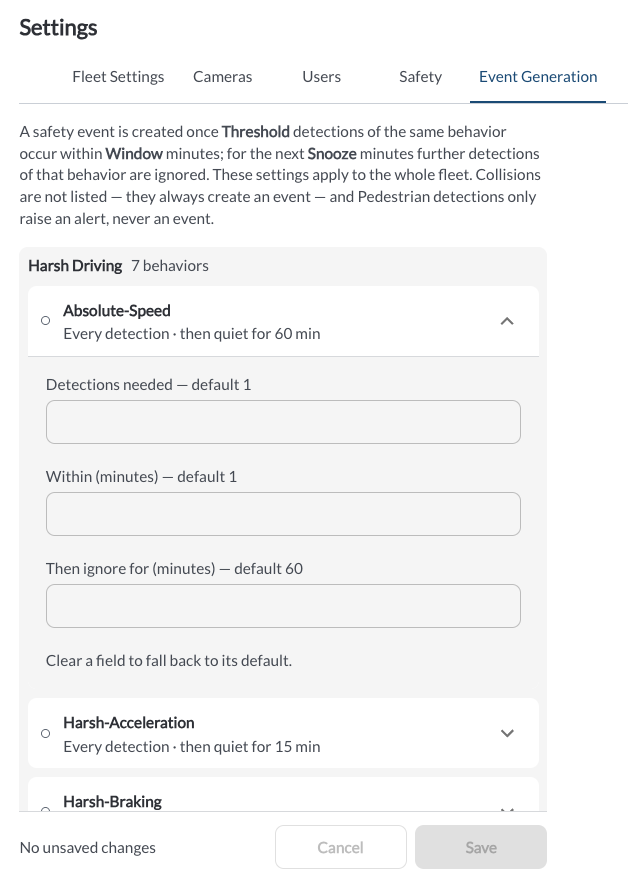
Available Settings
For each behavior, the following fields are available:
- Detections needed: How many detections of the same behavior are required to create one event. The default value for the behavior is shown next to the field label.
- Within (minutes): The rolling period in which those detections must occur. The default value for the behavior is shown next to the field label.
- Then ignore for (minutes): How long further detections of the same behavior are ignored after an event is created. The default value for the behavior is shown next to the field label.
Clear a field to fall back to its default.
Note
Collisions are not listed. A collision always creates an event from a single detection.
Note
Event Generation is turned off by default and behaves the same way for both Driver Safety and Safety.
Note
Raising the number of detections needed or lengthening the ignore period reduces the number of events your coaches see. It also reduces the number of events contributing to the Safety Score, so scores can rise after a change of this kind.
* Lytx may offer configuration options and recommendations, but the customer decides which settings to enable and remains solely responsible for using the product in compliance with its policies and applicable laws.