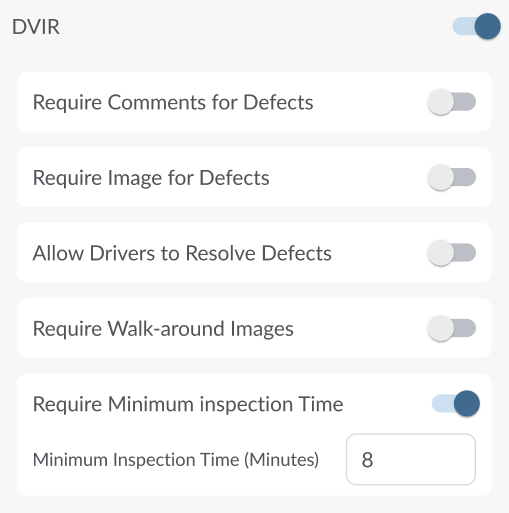
Use the Fleet Portal settings to enable DVIR and adjust configuration settings. These options control how drivers complete inspections, including whether comments, images, walk-around photos, or minimum inspection times are required.
Note
DVIR is an initial release and is available only upon request. If you do not see DVIR in your Fleet Portal, please contact your reseller to have the feature enabled for your account.
Enabling DVIR
- In the Fleet Portal, go to Fleet Settings → Compliance → DVIR.
- Toggle DVIR to On.
- Click Save to apply changes.
After saving, a DVIR section appears in the Fleet Portal side menu, the DVIR option becomes available in the Driver App for all linked drivers, and the additional DVIR configuration options are unlocked.
Configuring DVIR Settings
After enabling DVIR, you can configure additional settings to match your compliance and operational needs:
| Require Comments for Defects | When enabled, drivers must enter a text explanation whenever they mark a defect. |
| Require Image for Defects | Requires drivers to capture and upload a photo for each reported defect. |
| Allow Drivers to Resolve Defects | When enabled, drivers can change the status of a defect, marking it as Resolved, Unresolved (Critical or Non-critical), or Dismissed. If this setting is turned off, drivers will not be able to modify defect statuses from the Driver App. |
| Require Walk-around Images | Requires drivers to submit images during a vehicle walk-around inspection for verification. |
| Require Minimum Inspection Time | Displays a visible timer during the inspection process. The timer starts when the inspection begins and remains red until the minimum time is reached, then turns green to indicate that the minimum inspection duration has passed. |
| Minimum Inspection Time (minutes) | Defines the minimum time (in minutes) required to complete an inspection. The default value is 8 minutes. |
Saving Settings
Click Save to apply DVIR setting changes. After saving, a new DVIR section appears in the Fleet Portal side menu, and drivers will see the DVIR option in the Driver App.