The Set Odometer action controls which source the platform uses for a vehicle's odometer reading. By default the platform follows the odometer reported by the device from the vehicle's ECM. When the ECM reading is missing or unusable, the Virtual Odometer can be used instead: the device-reported odometer is ignored and the reading is counted up from GPS distance.
Maintenance schedules, IFTA distance, and ELD records on the asset all read this odometer, so setting it correctly is required for those records to show a usable value.
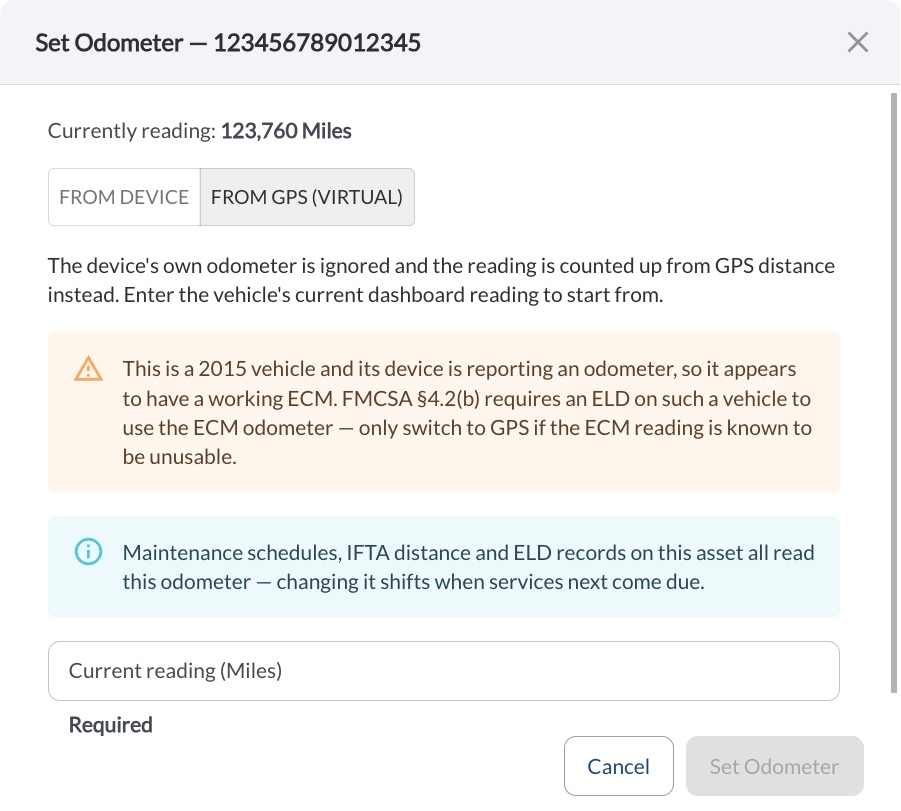
Odometer Sources
The Set Odometer dialog displays the current reading and two tabs:
- From Device – The vehicle follows its ECM odometer and the device owns the number. There is nothing to set on this tab. Switch to GPS only if the ECM reading is missing or unusable.
- From GPS (Virtual) – The device's own odometer is ignored and the reading is counted up from GPS distance. Enter the vehicle's current dashboard reading to start from.
How to Enable the Virtual Odometer
- In the Fleet Portal, go to Assets.
- Locate the asset you want to update.
- Click the (⋯) menu next to the asset and select Set Odometer.
- Select the From GPS (Virtual) tab.
- Review any messages displayed for the vehicle.
- Enter the vehicle's current dashboard reading in the Current reading field. This field is required.
- Click Set Odometer.
The Set Odometer button remains disabled until a value is entered. Click Cancel to close the dialog without saving.
Note
Maintenance schedules, IFTA distance, and ELD records on the asset all read this odometer. Changing it shifts when services next come due.
Note
Maintenance schedules, IFTA distance, and ELD records on the asset all read this odometer. Changing it shifts when services next come due.
How to Return to the Device Odometer
- In the Fleet Portal, go to Assets.
- Click the (⋯) menu next to the asset and select Set Odometer.
- Select the From Device tab.
- Click Clear & Follow Device.
The platform discards the virtual reading and follows the device-reported odometer again.