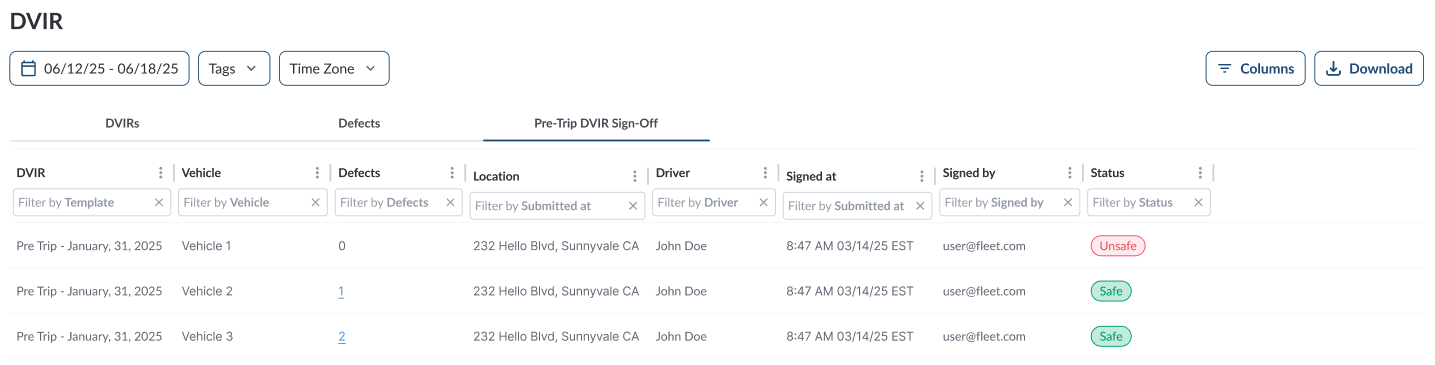
The Pre-Trip DVIR Sign-Off tab in the Fleet Portal confirms that a driver or designated person has reviewed the previous day's inspection before operating the vehicle. This step ensures compliance with federal regulations and provides a clear record that reported defects were acknowledged prior to the next trip.
Accessing Pre-Trip DVIR Sign-Off
- In the Fleet Portal, go to the Maintenance section.
- Select DVIR.
- The page has three tabs:
-
DVIRs: Shows all submitted inspections (see DVIR Reports Overview for more details).
-
Defects: Lists all defects reported during inspections (see DVIR Defects Overview for more details).
-
Pre-Trip DVIR Sign-Off: Displays sign-off status for pre-trip inspections.
Pre-Trip DVIR Sign-Off Table
The table displays all Pre-Trip DVIR Sign-Off records, allowing you to efficiently organize and access the details. It supports downloading, sorting, filtering, resizing columns, and other customization options. For a complete guide, refer to the article How to Use Table Options.
| DVIR |
Reference to the specific inspection report being signed off. |
| Vehicle |
The vehicle associated with the inspection. |
| Defects |
Number of defects reported in the DVIR. |
| Location |
The location where the pre-trip sign-off was completed. |
| Driver |
The driver performing the pre-trip inspection. |
| Signed At |
Date and time the pre-trip DVIR was signed. |
| Signed By |
The person who reviewed and signed the pre-trip DVIR. |
| Status |
Indicates whether the vehicle was signed off as safe to operate based on the previous inspection and defect review. |
Filtering