New: Location Privacy Mode
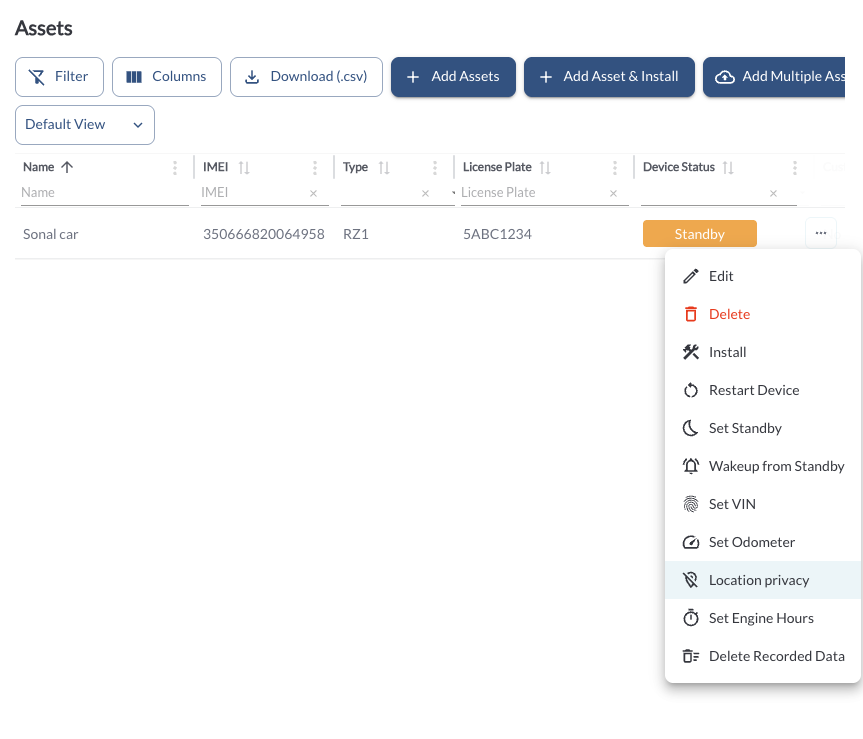
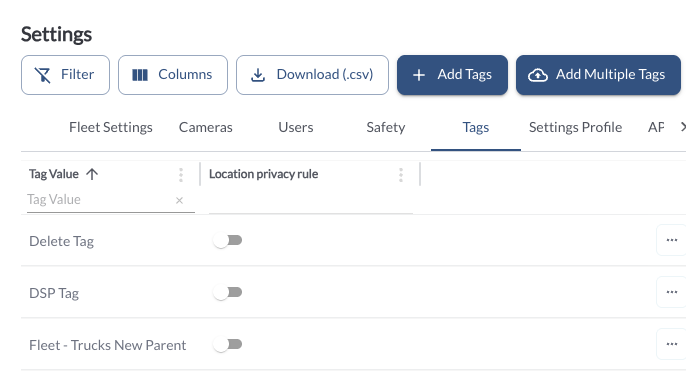
Privacy Mode lets a fleet manage a vehicle without retaining its location. While it is enabled, location is removed as data is received, so the vehicle has no live map position and no trips or geofence crossings are created.
Everything else continues to report — odometer, diagnostics, vehicle health and safety events. Location history recorded before Privacy Mode was enabled remains visible, and is labelled at the point where it ends.
Privacy Mode is set per vehicle or per tag in Settings, and requires the Manage Assets permission.
Location is removed as data is received and is not retained. Location data is not available for any period during which Privacy Mode is enabled, and cannot be reconstructed afterwards.
Privacy Mode affects location-derived records, including trip history, geofence activity and distance-based reporting. Fleets are responsible for determining whether Privacy Mode is compatible with their own record keeping, tax and regulatory obligations before enabling it, and for any notices or consents required by applicable law. Enabling Privacy Mode does not by itself satisfy any privacy or data protection requirement.
New: Spanish and French in the Fleet App
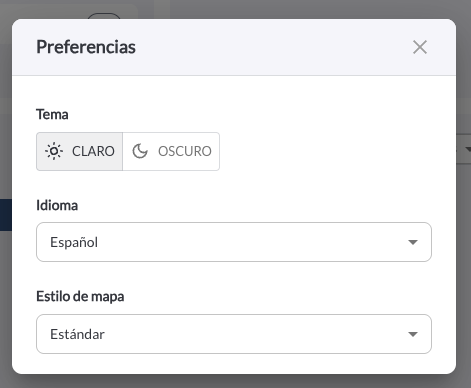
The portal is available in Spanish and French across the menu, dashboards, map, safety, assets and driver pages, along with the shared tables and dialogs.
Saved views, table filters, CSV import, and the sign-out and update banners are translated. Numbers, dates and chart labels follow the selected language, and screen-reader labels on the mobile toolbar do the same.
Translations are provided for convenience. Where translated text and the English text differ, the English text governs.
New: Device Announcements in Spanish
Provide the ability to set device announcement language in device settings. This feature is only applied to devices with firmware version 2.6.320 or greater.
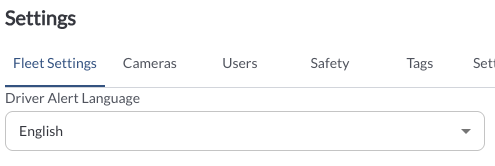
Translations are provided for convenience.
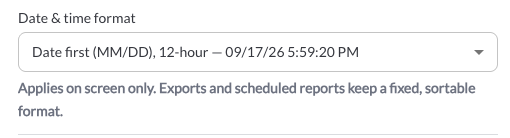
New: Date and Time Format Picker
Fleet Settings includes a date and time format picker that applies everywhere times appear in the app. Each option is previewed against a live timestamp. Fleets that do not change the setting see the format they see today, and exports retain their fixed sortable format.
The Fleet/Local timezone switch is also available on the shared DSP filter bar, and the selection carries across every DSP page.
New: Checklist Inspections and Trailer Defects
Drivers can confirm every item on an inspection as Safe or Defect, using an opt-in checklist mode with a Mark all Safe action. Drivers see the items their assigned template lists.
An inspection can also record up to two trailers, with each defect naming the unit it was found on. The unit appears on the report, the PDF and the review screen.
Fleets and drivers are responsible for the accuracy and completeness of inspection records and for any certification made on them.
New: Inspection Part Coverage in the Template Editor
The template editor identifies the inspection parts listed in the applicable federal requirements, shows coverage as a template is built, and lists any parts not yet covered. A template must cover all of them before it can be saved, and each defect is badged with the part it belongs to.
A new template starts from the default inspection items, and a rejected edit states the reason. You are warned before an edit removes catalog entries other templates rely on.
Fleets are responsible for ensuring that any template they create captures all items required by applicable regulations and their own maintenance program. Lytx makes no representation that a fleet-authored template satisfies any regulatory requirement. Coverage indicators are an aid to template design and are not a determination of compliance.
Improvement: DVIR Template Assignment
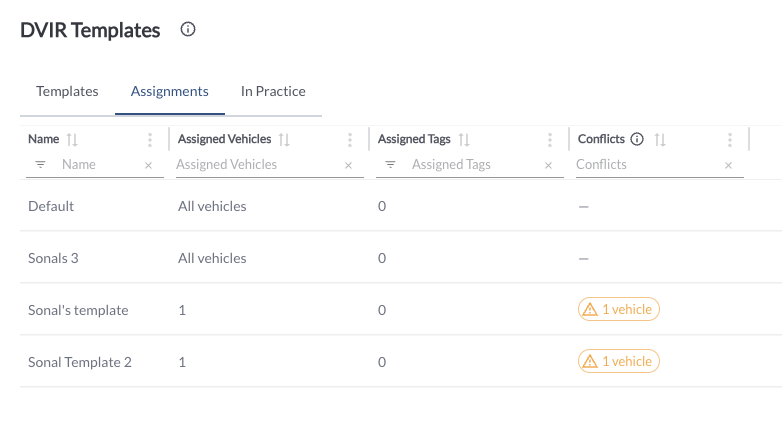
Where a vehicle matches more than one template, assignment resolves to the most specific: vehicle, then tag, then all-vehicles. A fleet's own template takes precedence over the system default, and only templates a fleet has enabled are offered to drivers.
A new In Practice tab shows which form each vehicle receives, and the Assignments tab identifies vehicles with unresolved assignments so they can be settled.
Filed reports are retained against the template in effect when they were signed, including the category and item names as they read at that time.
Improvement: DVIR Sign-off and Reports
Inspection status is an explicit driver selection. The driver chooses a status, and confirms before certifying a vehicle safe while a critical defect is open.
Before signing off a previous report, the driver is shown the repair certification and the inspection items. Drivers are notified when the most recent report on their vehicle requires sign-off, with a Review now action.
The report identifies who repaired each defect and who reviewed the report, on screen and in the PDF, and both read the same. An odometer entered by the driver during an inspection is recorded on the report and appears in the app, the portal and the PDF. Report dates and Reported At are shown in the fleet's timezone across the app, the portal and the PDF.
On mobile, Review, Download and Update are available, and defect photos open full size.
Improvement: Posted Speed Limit Matching
Posted speed limit matching has been updated. Limits are matched by direction of travel, road segments are preferred over parking aisles and similar features, and a limit is applied only where the road data and the GPS fix meet a confidence threshold.
Posted speed limits are derived from third-party road data, which may be incomplete, out of date or inaccurate for a given location. Posted-speed events are indicative and should be verified before being relied on. Fleets are responsible for how speed data is used, including compliance with applicable employment, collective bargaining and privacy obligations.
Note
Fleets should expect a change in posted-speed event volume following this release. Events recorded before the release are unchanged.
New: In-Cab Audio Controls for Alert Volume
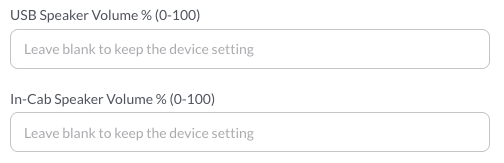
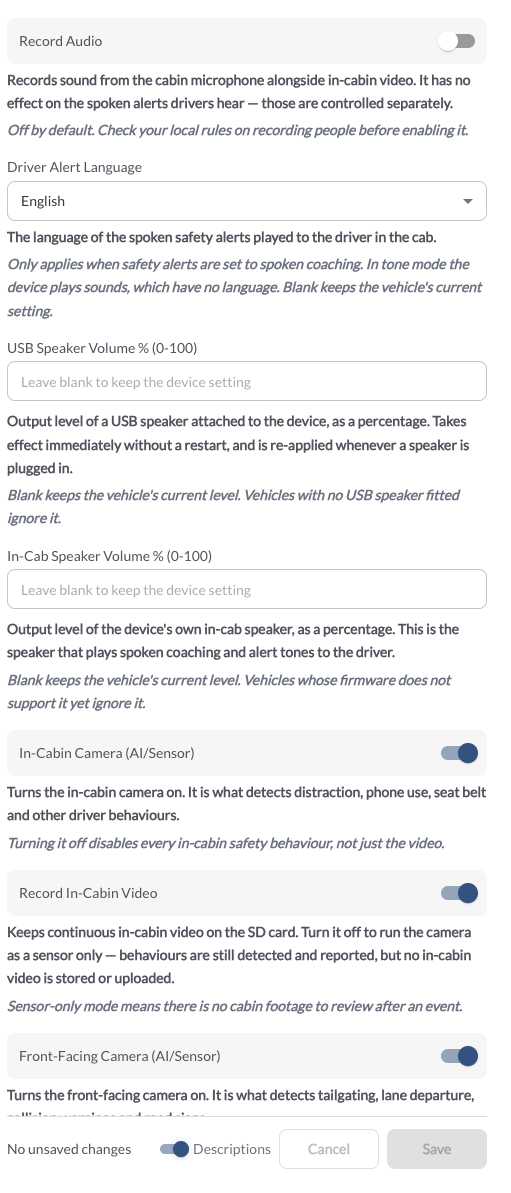
USB speaker volume is now a setting, from 0 to 100%, per fleet or per vehicle, and takes effect without a restart. Spoken safety alerts are available in Spanish alongside the existing languages.
A single switch controls audio across all auxiliary cameras, replacing the previous per-camera toggles.
New: Alert Timeline in Safety Settings
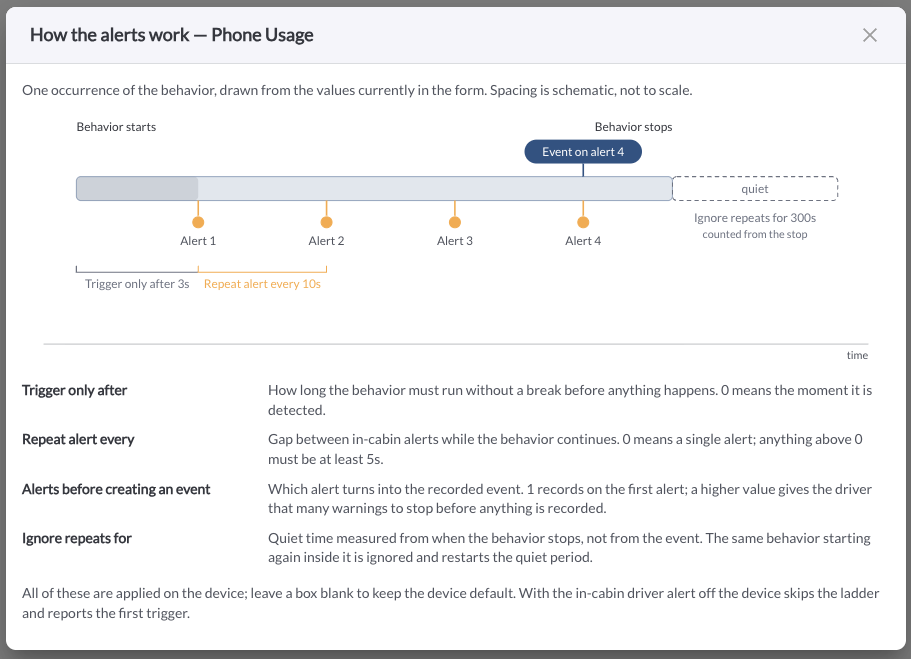
An information button in Settings → Safety draws the configured alerts, the event, the correction window and the quiet period on a single timeline, so a configuration can be read at a glance before it is saved.
New: Continuous Recording Quality Settings
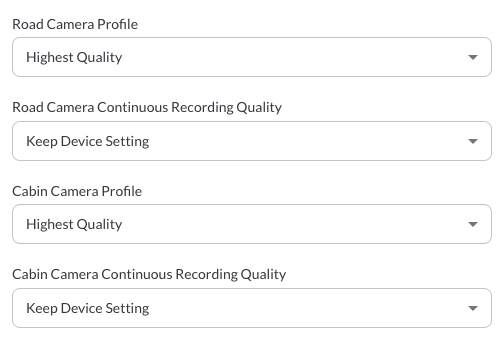
Road and cabin cameras have their own continuous recording quality settings, separate from safety clip quality. This requires RZ1 device version 2.6.320 or greater.
Note
The existing camera profile settings are renamed to distinguish safety clip quality from continuous recording quality, and the blank option is named Keep Device Setting on driver alert language, steering side and the quality profiles. Update any internal training material that refers to the previous names.
New: Video Retention Limit and Delete Recorded Data
A fleet can set how long vehicles keep recorded video, from 5 minutes up to 90 days, per fleet or per vehicle. Leaving the value blank keeps the vehicle on its current setting; -1 records until the card fills. This requires RZ1 device version 2.6.320 or greater.
Reducing the retention period and deleting recorded data remove video permanently. Deleted video cannot be recovered. Video may be required in connection with a collision, claim, insurance matter, investigation or legal proceeding. Fleets are solely responsible for setting retention consistent with their own legal, insurance and preservation obligations, including any litigation hold, and for ensuring data subject to a preservation obligation is not deleted.

New: Setting Descriptions in Device Settings
A Descriptions toggle in the Device Settings footer explains what each of the 25 settings does, and what happens if the value is left blank. Clearing a value leaves the vehicle on the setting it was last sent.
Improvement: Vehicle Health Reporting
Road-facing camera obstruction is reported as informational and appears under the vehicle's health issues, without raising a health alert or email. Camera obstruction and tampering on the road camera do not contribute to the vehicle's health status.
Where a vehicle has never reported engine hours, the sidebar, the assets and maintenance tables and the CSV exports indicate that no reading is available, and Mark as Service accepts entries on those vehicles. A trip on a vehicle with no odometer source is reported as a missing reading rather than an odometer anomaly.
Note
Fleets that monitor road camera obstruction or tampering should review the vehicle's health issues list, as these conditions do not generate a health alert or email.
Improvement: Asset Tracker Configuration and Location History
Asset trackers run on a 12-hour heartbeat with movement reporting disabled. Motion-wake sensitivity uses its default value, and the listen window following each report is shortened to conserve battery.
Tracker location history covers up to 90 days. Because trackers report at intervals rather than continuously, the trail is drawn as a dotted line, with addresses resolved in a single pass and labelled by geofence where the fleet prefers that.
Battery life is an estimate based on a 12-hour heartbeat with movement reporting disabled. Actual battery life varies with temperature, cellular coverage, reporting frequency and configuration, and is not guaranteed. Asset trackers report at intervals and are not a real-time location or recovery service.
Improvement: Alert Rules
Every alert rule matching an event notifies its own recipients. Where two rules cover the same event, each sends its own email naming that rule, and each has its own row in the Alerts Log.
Alerts and notifications depend on device connectivity, cellular coverage and email delivery, and should not be relied on as the sole means of detecting an event or condition.
Improvement: VIN Management
Clear is available for any VIN on an asset. Once cleared, the VIN reported by the vehicle is used.
Improvement: Platform Speed
The trips, safety events and driver score pages load more quickly.
Bug Fixes
DVIR
- Only templates a fleet has enabled are offered to drivers.
- The Defects link opens the report's defects.
- Defects recorded on the power unit are accepted, the unit can be named from the defect list, and a trailer numbered “power” is treated as a trailer.
- A defect's reporter shows the driver's name.
- A template description can run to more than one line.
- The driver app reports a failed submit or attachment save to the driver.
Safety and Camera
- Posted Speed alerts follow the alert type configured for the vehicle.
- The Safety Behaviors report completes on large fleets.
- In-cab messages display when two alerts arrive at the same time.
Settings
- Settings screens display their stored values after a page reload.
- Safety settings reject values outside the permitted range before saving.
- Wi-Fi network settings apply on all supported firmware versions.
- A minus sign typed into a device setting does not clear it.
Assets
- Odometer readings report correctly on vehicles whose gauge reads in kilometres.
- Values are recorded only for the readings a vehicle provides.
Fleet Dashboard
- The Upcoming Maintenance widget loads for users who are not assigned to a fleet.
- Fuel widgets appear only for fleets with Fuel Hub.
CSV Exports
- The Time on Site export follows the sort applied on the page.
Important Information
Availability. Features described here vary by subscription, device model, firmware version, region and configuration. Some are in limited release or disabled by default. Contact your reseller or account team to confirm availability for your account.
These notes. This document describes the software as of the release date and is provided for information only. It is subject to change, creates no warranty, representation or commitment, and does not modify any agreement between Lytx and the customer. It does not describe future functionality.
Compliance. Fleets are responsible for their own compliance with all applicable laws and regulations, including inspection, recordkeeping, tax, employment, collective bargaining, privacy and data protection requirements. The software is a tool to support a fleet's own program. It does not determine, certify or guarantee compliance, and nothing in this document is legal advice.
Notices and consent. Fleets are responsible for providing any notices and obtaining any consents required by applicable law before collecting video, audio, location, biometric or telematics data, including any driver-facing capture.
Data retention. Retention settings and deletion actions remove data permanently. Fleets are responsible for configuring retention consistent with their own legal, insurance and preservation obligations.
Third-party data. Map, road, posted speed limit, address and geocoding data is supplied by third parties and may be incomplete, out of date or inaccurate.
Driver assistance. Detection and alerting features are aids to a fleet's safety program. They do not identify every condition or event and do not replace attentive driving or the driver's judgment.
©Lytx, Inc. – Confidential & Proprietary
Lytx, Inc. owns the LYTX and SURFSIGHT trademarks and other related trademarks and logos. The TM or SM refer to a trademark or service mark, respectively used by Lytx, Inc. The ® symbol refers to a trademark registered in the USA and elsewhere.